Boot Switch Setting:
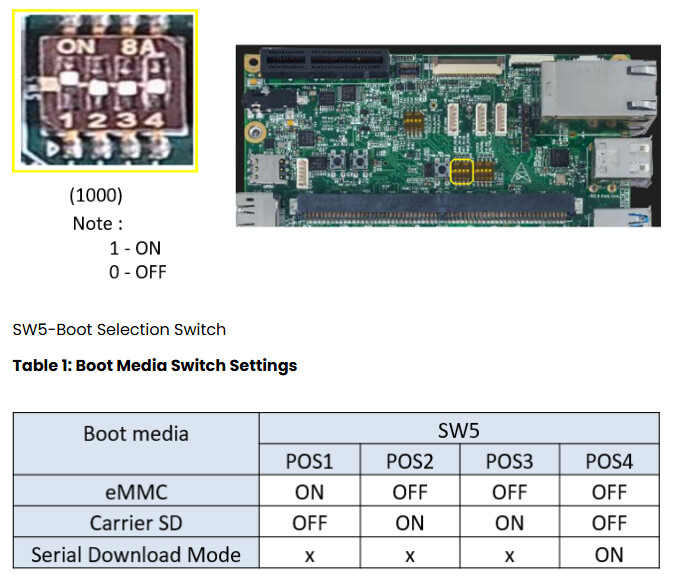
The boot mode on a SMARC carrier board is typically controlled by a DIP switch. For the i.MX95, these pins determine whether the processor boots from eMMC, SD Card, or USB (Serial Download).
Make sure On-Board Switch (SW5) is set properly in iG-G61D (development platform) as shown below image.
Debug Port Setting:
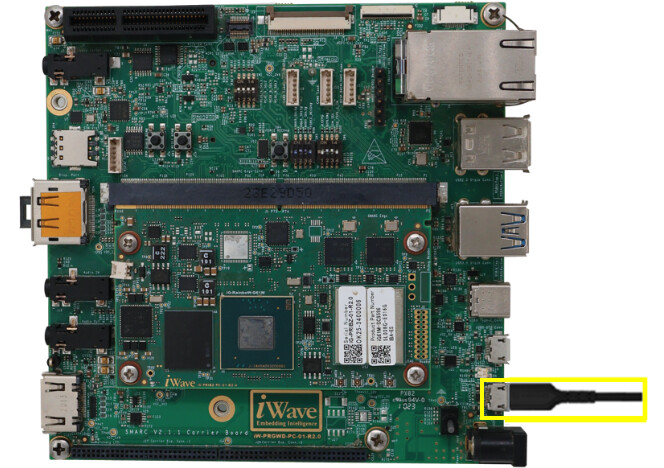
The iG-G61D typically utilizes a USB-to-UART bridge for debugging, accessible via a micro-USB or USB-C “Debug” port on the carrier board.
Connect Type-A end of USB cable to PC and Micro-B end of USB cable to Development Platform’s debug USB Micro-AB connector (J24) in iG-G61D (development platform) as shown below.
Install the driver for Debug USB Port in Host PC/Laptop using the below link.
https://ftdichip.com/drivers/vcp-drivers/
Setting up the Debug Terminal parameters:
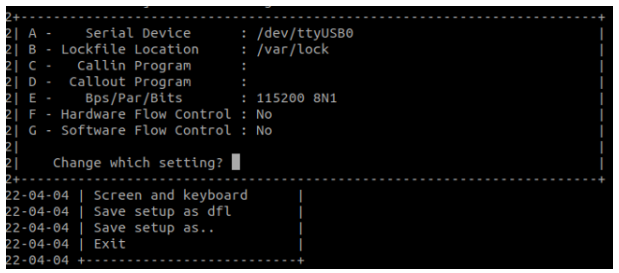
Baud Rate : 115200, Data bits : 8, Parity : None, Stop Bits : 1, Flow Control : None
On the command prompt of the Linux host machine, run the following command to determine the port number:
$ ls /dev/ttyUSB*
The smaller number is for ARM® Cortex®-A53 core and the bigger number is for ARM® Cortex ®-M4 core.
Minicom
Use the following commands to install and run the serial communication program (minicom as an example):
-
Install Minicom using Ubuntu package manager.
$ sudo apt-get install minicom -
Launch Minicom using a console window using the port number determined earlier.
$ sudo minicom -s -
Configure Minicom as show in below figure,
-
Next step is to Power ON the board.
Powering ON:
Connect the 12V power supply plug to the power connector (J26) in iG-G61D of the Development Platform as shown in the above debug port setting image and switch ON the power supply. Once power is applied to the iG-G61D Development Platform, the power LEDs in the SMARC SOM and carrier board will glow.
Warning:
-
Do not try to connect any other power supply other than supplied along with the Development Kit
-
Do not plug or remove the SMARC SOM from carrier board i.MX95 with live power
-
Contact iWave, if power LEDs are not glowing.
Boot Screen:
User must go through “Software User Guide” and get familiar with software section of iG-RainboW-G61D-i.MX95 SMARC SOM Development Platform.
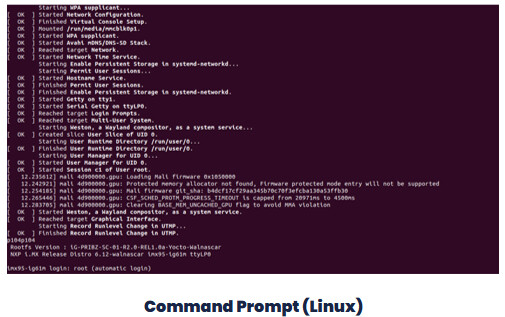
Power is applied to the Development Platform & once the boot is success, depending upon the supported operating systems and boot loader on particular delivery, boot messages being prompted in the terminal window as shown below. Press Enter key in terminal and done with test environment setup on particular delivery.
For further inquiries, please get in touch with mktg@iwave-global.com
Please find the detailed G61M product information in the below link,