Please follow below steps (provided with images) to resolve the PTP issue on GEM0 in Vivado tool:
- In Zynq UltraScale+ MPSoC IP, enable GEM0 and configure the MIO pins in the I/O Configuration tab.
- In the PS-PL Configuration tab, enable the TSU signal for GEM0, along with TSU BUFG and the clock from PL option.
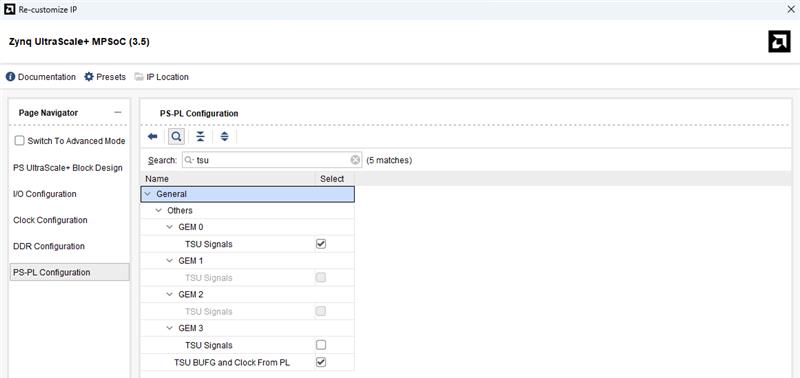
- Connect
fmio_gem_tsu_clk_from_plandfmio_gem_tsu_clk_to_pl_bufgin a loopback.
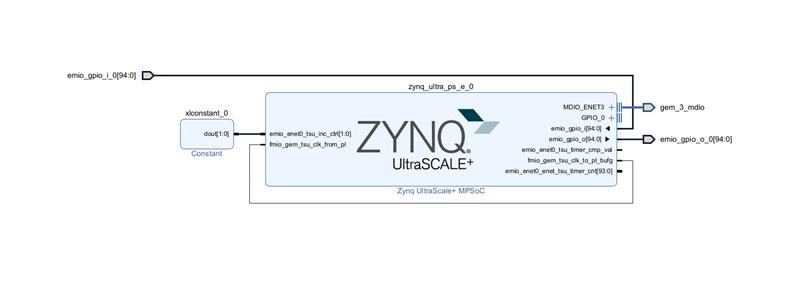
- Connect
emio_enet0_tsu_inc_ctrlto a Constant IP, and set the constant value to 2 ‘b11 to enable normal timer register increments.
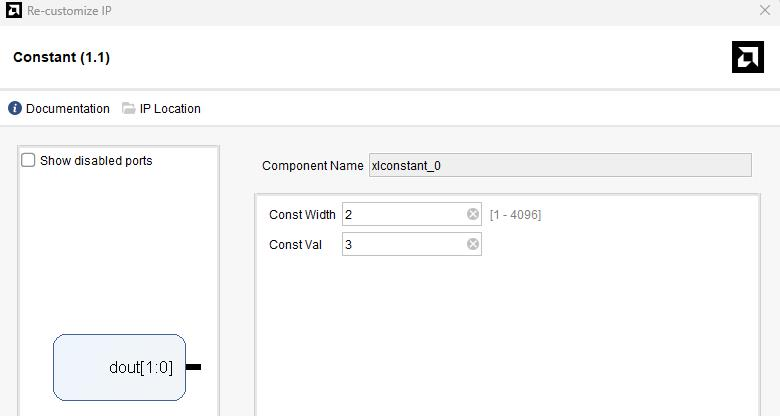
With the above steps the XSA and the binaries must be re-compiled.
For further product inquiries, please get in touch with our sales team at mktg@iwave-global.com
Please find the detailed product information here:
Zynq™ UltraScale+™ ZU15/ZU9/ZU6 MPSoC System on Module