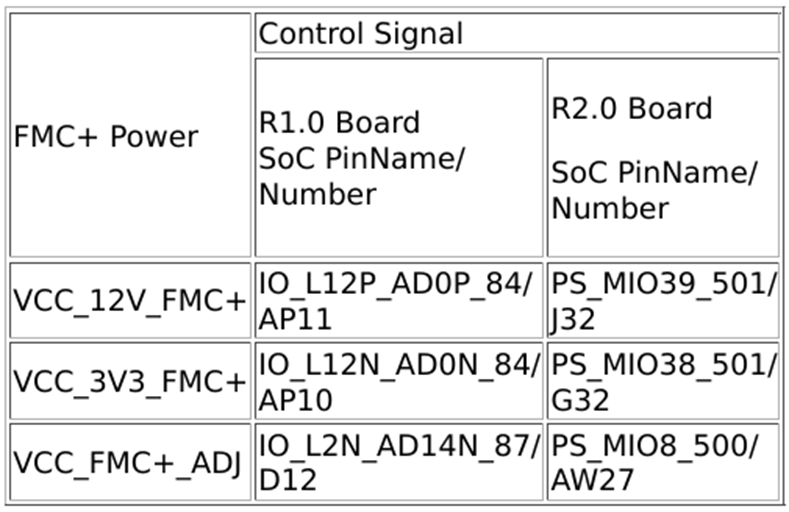
Please refer software use guide, “FMC+ Connector – Power on” section to enable the FMC+ power.
Refer “fmc_plus_power_disable” function & create “fmc_plus_power_enable” function by changing the value from “low” to “hign” for the MIO pins to enable the FMC+ power in R2.0 carrier card.
Refer the below code for configuring MIO8:
/* Set MIO8 direction as output - FMC+_VADJ */
RegVal = Xil_In32(0xFF0A0244) | 0x00000001;
Xil_Out32(0xFF0A0244, RegVal);
/* Set MIO8 output enable */
RegVal = Xil_In32(0xFF0A0248) | 0x00000001;
Xil_Out32(0xFF0A0248, RegVal);
/* Set MIO8 to High /
RegVal = Xil_In32(0xFF0A0044) | 0x00000001; / Changed this from Low to High*/
Xil_Out32(0xFF0A0044, RegVal);
(void)usleep(5);
For R1.0 carrier card, the PL pins are configure as EMIO and can be set to high in the Baremetal application to enable the FMC+ power.
For further product inquiries, please get in touch with our sales team at mktg@iwave-global.com
Please find the detailed product information here:
ZU49/ZU39/ZU29DR RFSoC System on Module